


- Регистрация
- 17 Февраль 2018
- Сообщения
- 40 832
- Лучшие ответы
- 0
- Реакции
- 0
- Баллы
- 8 093
Offline
A timesaving trick that your wrists will thank you for.

Image: Pexels: Andrea Piacquadio
If you’ve ever doing an assignment for work or study that requires you to display information about a country, you could manually search for it and type it out in Microsoft Excel, but that would be very laborious. Instead, you could use Excel’s data types to call in the information you want in a flash. Here’s how to do that.
What to do:
Assume you have to fill out information about three countries, Italy, France, and England, in an Excel spreadsheet. To find statistics like the population, the birthrate, and other statistics you could manually search for that information on the web and then fill it into the spreadsheet.
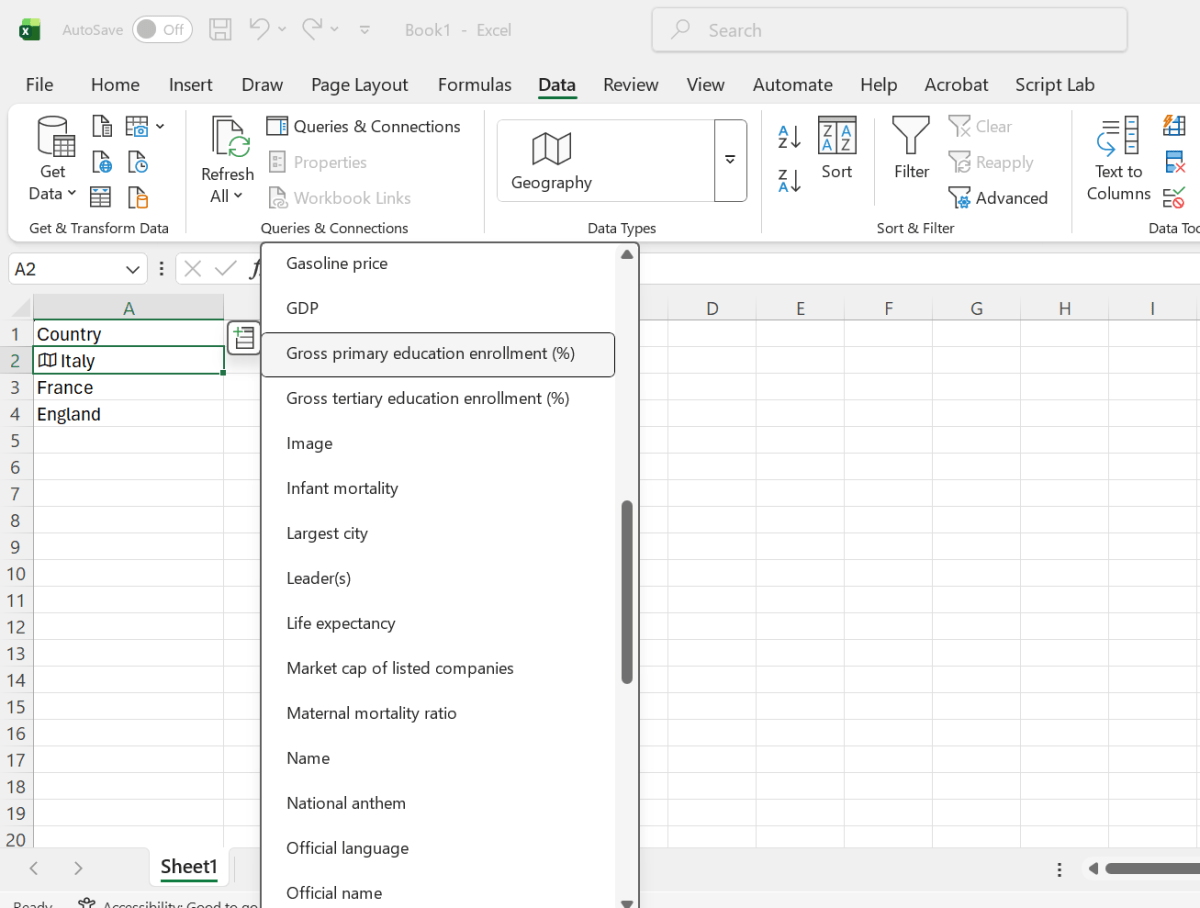
But the fast way is to click on the cell with the country name and select Data from the top menu in Excel. Then choose the geography data type. This will put a small marker next to the country name in the cell and a drop-down menu will appear next to it. If you click on that drop-down menu, you will be presented with the option to select information relating to that country. You can then go ahead and choose the information that you’d like to include (see the image below).
Dominic Bayley / Foundry
And that’s all there is to it! If you’d like more tips and tricks delivered to your inbox be sure to subscribe to our PCWorld Try This website.
Author: Dominic Bayley, Australian Editor, PCWorld
Based in Australia, Dominic Bayley is a hardcore tech enthusiast. His PCWorld focus is on PC gaming hardware: laptops, mice, headsets and keyboards.
Recent stories by Dominic Bayley:
Image: Pexels: Andrea Piacquadio
If you’ve ever doing an assignment for work or study that requires you to display information about a country, you could manually search for it and type it out in Microsoft Excel, but that would be very laborious. Instead, you could use Excel’s data types to call in the information you want in a flash. Here’s how to do that.
What to do:
Assume you have to fill out information about three countries, Italy, France, and England, in an Excel spreadsheet. To find statistics like the population, the birthrate, and other statistics you could manually search for that information on the web and then fill it into the spreadsheet.
But the fast way is to click on the cell with the country name and select Data from the top menu in Excel. Then choose the geography data type. This will put a small marker next to the country name in the cell and a drop-down menu will appear next to it. If you click on that drop-down menu, you will be presented with the option to select information relating to that country. You can then go ahead and choose the information that you’d like to include (see the image below).
Dominic Bayley / Foundry
And that’s all there is to it! If you’d like more tips and tricks delivered to your inbox be sure to subscribe to our PCWorld Try This website.
Author: Dominic Bayley, Australian Editor, PCWorld
Based in Australia, Dominic Bayley is a hardcore tech enthusiast. His PCWorld focus is on PC gaming hardware: laptops, mice, headsets and keyboards.
Recent stories by Dominic Bayley:
